
ChatGPT vs Other AI Tools
The world of AI chatbots has grown fast, and there are now many powerful options to choose from. With so many out there, figuring out which one fits your needs can be intimidating. Many people have chosen a favorite AI tool and are biased towards that model. Keep in mind that there is no one-size-fits all tool because each one has its own strengths and weaknesses. Those who limit themselves to just one tool are missing out on the unique advantages that different AI models offer.
This section puts today’s leading AI models head-to-head. You’ll discover what each model does best, where it falls short, and which one to choose for your specific needs. I’ll also walk through the features included in the free tier and highlight what additional capabilities the paid version (most are ~$20/month) unlocks.
- ChatGPT → Basic everyday needs: creativity, brainstorming, reasoning, learning, problem-solving
- Gemini → Data analysis, file/image/video analysis, complex/technical problem solving
- Claude → Writing, editing, coding, having nuanced discussions
- Perplexity → Real-time web search with citation backed sources
- Copilot → Increases productivity within Microsoft 365
At a Glance
- Developer: OpenAI
- Best for: Everyday creativity, reasoning, learning, and personalized problem-solving
- Nickname: The Universal Assistant
Quick Take
A versatile, humanlike AI that blends conversation, logic, and creativity. Reliable for most general and professional tasks, from brainstorming and coding to writing and researching. ChatGPT’s strong memory and Custom Instructions feature allows it to get to know the user’s personality at a fundamental level. This is both a blessing and a curse: on one hand it allows for highly personalized responses, but on the other it causes responses that sometimes clearly favor confirmation bias. I’d recommend using this as your daily go-to AI tool and adding in other models for certain tasks (more on this below).
Performance
Strengths:
- Natural, flowing conversation
- Deep reasoning and coding ability
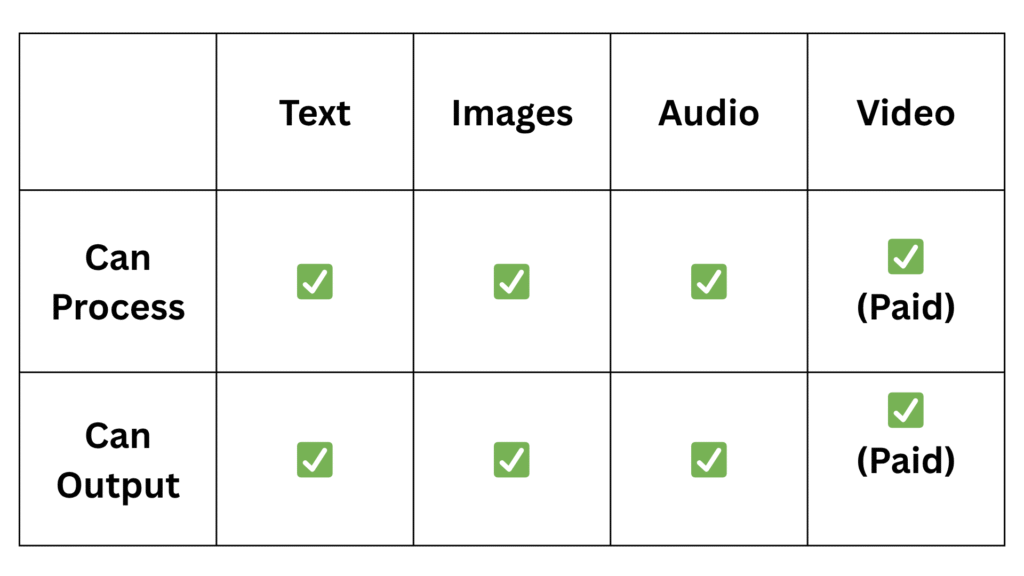
- Multimodal comprehension – text, image, audio, file (but need paid tier for video)
- Personalized memory and custom instruction tuning
- High daily usage limits with free tier
Weaknesses:
- Prone to hallucinations
- Personalization may lead to confirmation bias in responses
- Weaker real-time web browsing than Perplexity or Gemini (when searching the web, ChatGPT will sometimes output outdated data)
Context Window: 128,000 tokens (~200 pages of text)
Multimodality
Other Features
Free version:
- Deep Research: Looks across many sources to find accurate, detailed information for you
- Custom Instructions: Lets you personalize how ChatGPT responds and what it knows about you for consistent, tailored replies.
Paid version only:
- Custom GPTs: Create specialized versions of ChatGPT with unique skills, instructions, and APIs for specific tasks
- Sora: Text-to-video model that generates realistic videos directly from written descriptions.
- Agent Mode: Allows ChatGPT to autonomously perform multi-step tasks, use tools, and make decisions to complete objectives
- Live video streaming: Enables ChatGPT to see and analyze your environment in real time through your camera
- Connect to Google Drive: Lets ChatGPT access, search, and summarize documents, spreadsheets, and presentations stored in your Drive
At a Glance
- Developer: Google Deepmind
- Best for: Multimodal reasoning, file/data analysis, real-time information gathering, connecting to Google Drive
- Nickname: The Analyst
Quick Take
Go-to AI tool for data/file analysis and complex problem soving. Able to process many data types (text, audio, images, video, computer files) as well as massive files (hundreds of pages long). Incredibly well integrated with Google Search and Workspace. Less creative and personizable than other AI tools.
Performance
Strengths:
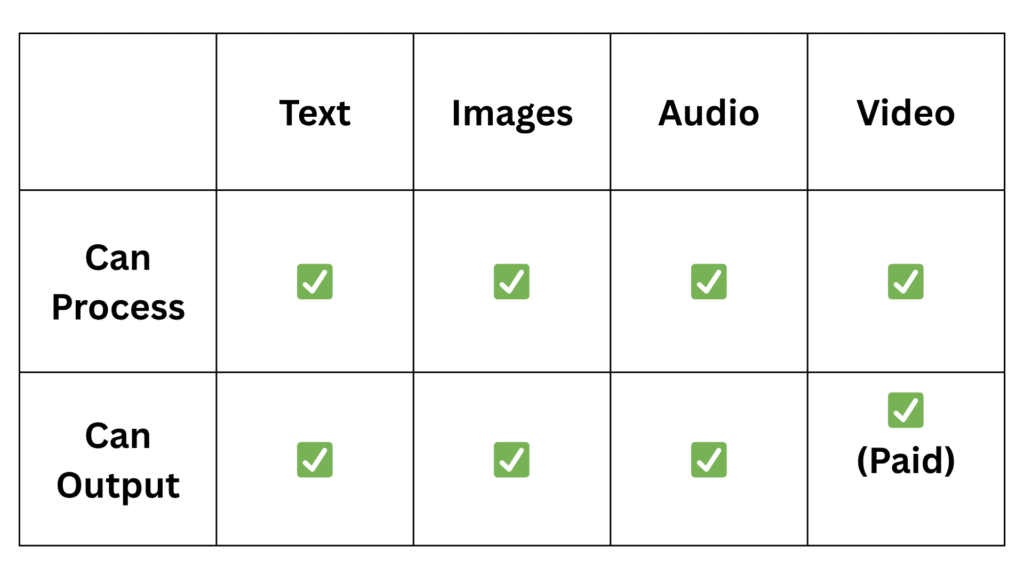
- Multimodal comprehension – free tier can work with text, audio, images, video, files
- Deep integration with Google Search and Google Drive
- Better web browsing abilities than ChatGPT
- High daily usage limits with free tier
- Massive context window
- Strong reasoning on complex, technical material
- Reponses are less prone to confirmation bias
Weaknesses:
- Prone to hallucinations
- Feels less conversational and creative than ChatGPT
- Limited personalization and memory features
Context Window: 1,000,000 tokens (~1,500 pages of text)
Multimodality
Other Features
Free version:
- Live video streaming: Enables Gemini to see and analyze your environment in real time through your camera
- Connect to Google Drive: Lets Gemini access, search, and summarize documents, spreadsheets, and presentations stored in your Drive
Paid version only:
- Deep Research: Looks across many sources to find accurate, detailed information for you
- Veo 3: Google’s advanced AI video generation model for creating cinematic-quality videos from text prompts
At a Glance
- Developer: Anthropic
- Best for: Writing/editing, coding, analyzing large documents, having nuanced conversations
- Nickname: The Thoughtful Scholar
Quick Take
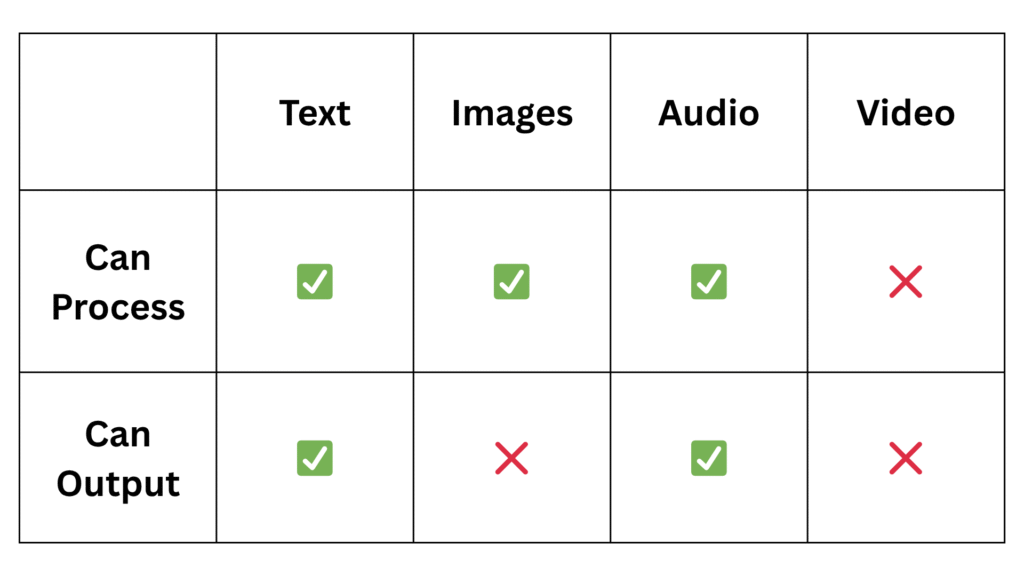
Go-to AI tool for writing, editing, and coding. While ChatGPT’s writing can sometimes sound characteristically “AI-generated,” Claude’s tone tends to be more natural and closer to human writing. Able to process very large computer files like Gemini, but multimodality is the worst of the bunch. Some enjoy Claude’s cautious approach when discussing nuanced topics, while others find it limiting (e.g. when asked for investment ideas, Claude refuses and says it’s “not a financial advisor”). Low daily usage limits for the free tier can be a barrier.
Performance
Strengths:
- Polished writing style
- Coding abilities
- Ability to tackle nuance/complex topics
- Reponses less prone to confirmation bias
- Massive context window
Weaknesses:
- Poor multimodality (cannot generate images or handle videos)
- Can be overly cautious with responses
- Low daily usage limits
Context Window: 1,000,000 tokens (~1,500 pages of text)
Multimodality
Other Features
Free version:
- Artifacts: Displays generated code, text, or designs in an interactive workspace you can edit and iterate on in real time
- Connect to Github: Lets Claude access repositories for reviewing, debugging, or documenting code directly
- Ability to select “use style”: Choose between normal, learning, concise, explanatory, or formal depending on
Paid version only:
- Deep Research: Looks across many sources to find accurate, detailed information for you
- Connect to Google Drive: Lets Claude access, search, and summarize documents, spreadsheets, and presentations stored in your Drive
At a Glance
- Developer: Perplexity AI
- Best for: Real-time web research with citation backed sources.
- Nickname: The Researcher
Quick Take
Go-to AI tool for research. It’s ability to quickly browse the web for accurate real-time data while citing its sources is second to none. Perplexity AI even launched an AI-powered browser called Comet which will compete with other search engines like Google Chrome. Perplexity also has a built-in “Discover” section that displays news articles in tech, science, finance, and more. Some enjoy Perplexity’s concise responses while others prefer other AI models for longer form responses. Since Perplexity is primarily a research tool, its creative, problem solving, and data analysis abilities are weaker than other models.
Performance
Strengths:
- Real-time search and source citation
- Reliability (less prone to hallucinations)
- Provides concise, to-the-point summaries
Weaknesses:
- Very low context window
- Weaker at non-research based tasks (creativity, problem solving, data analysis, etc)
- Can over-compress nuanced topics into bullet summaries
Context Window:
- Text-based prompts: 8,000 tokens (~12 pages of text)
- File uploads: 32,000 tokens (~50 pages of text)
Multimodality
Other Features
Free version:
- Deep Research: Looks across many sources to find accurate, detailed information for you
- Discover: Suggests relevant content tailored to your interests, guided by your previous searches and preferences
Paid version only:
- Labs: Transforms prompts into complete projects by researching, coding, and generating charts, reports, or interactive dashboards automatically
At a Glance
- Developer: Microsoft
- Best for: Increasing productivity within Microsoft 365
- Nickname: The Office Assistant
Quick Take
Copilot is Microsoft’s AI assistant, available both as a standalone app (like ChatGPT, Claude, etc) and integrated directly into Microsoft 365 apps like Outlook, Word, Excel, PowerPoint, etc. It’s ability to record Teams meetings and summarize meeting minutes is especially valuable. Many large corporations have Microsoft 365 and give their employees access to Copilot while blocking all other AI tools for data privacy concerns. I find the Microsoft 365 integration genuinely helpful, but the standalone Copilot app is noticeably weaker (at pretty much everything) than the other AI tools discussed in this section. It feels like ChatGPT on guardrails. While it’s certainly better than having no AI tools at all, it’s disappointing that many companies limit their employees to one of the least capable AI models available.
Performance
Strengths:
- Integration with Microsoft 365
- Strong data privacy and enterprise-grade security
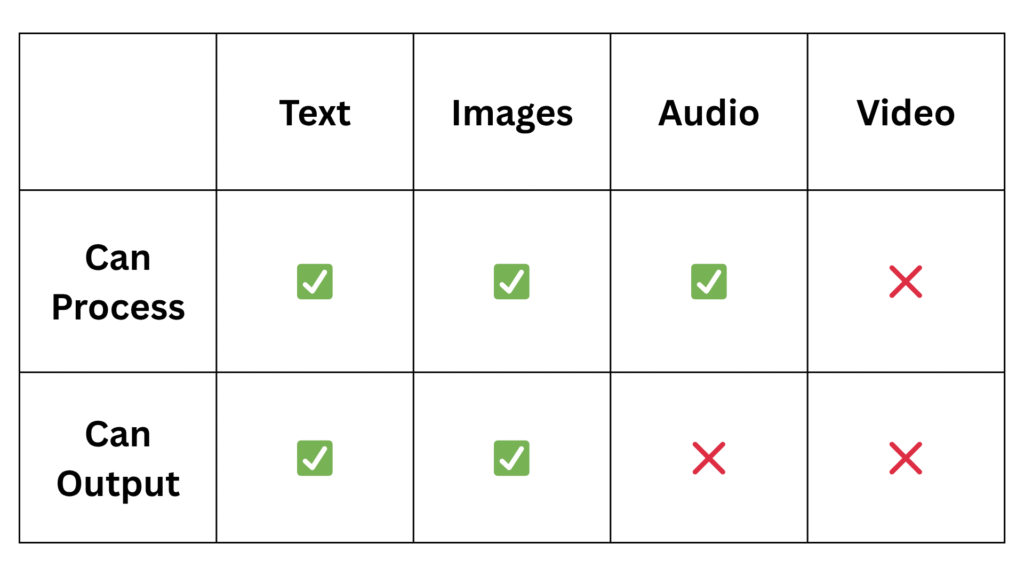
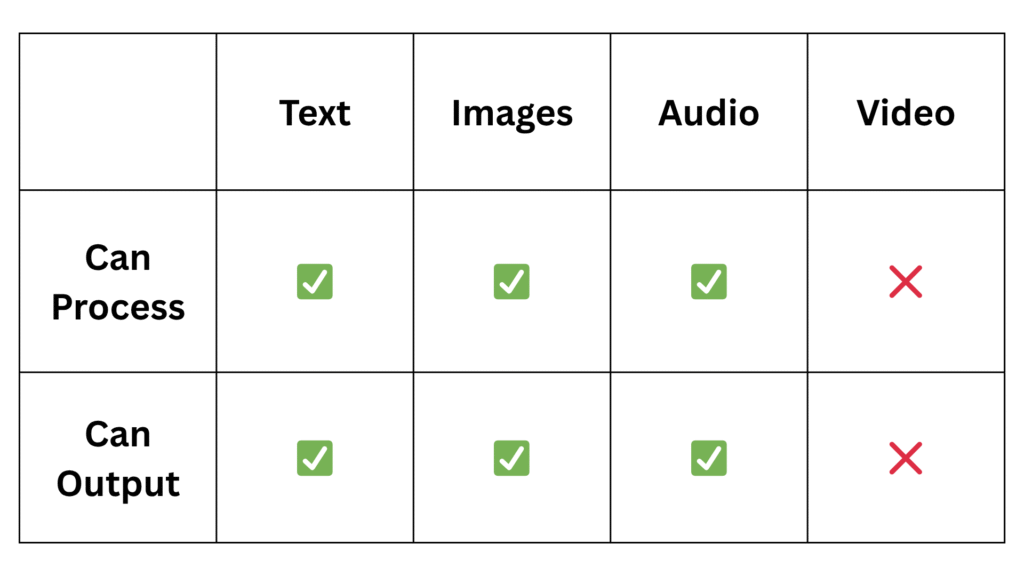
- Good multimodality (text, audio, images, computer files)
Weaknesses:
- It’s short form responses make it difficult to dive deep into complex topics
- Weaker reasoning and problem solving abilities than other AI tools
- Smaller context window than other models
Context Window:
- 64,000 tokens
Multimodality
Other Features
Free version:
- Integration with Microsoft 365 (if you have it)
Paid version only:
No paid version available
Other Tools
Developed by xAI (Elon Musk’s AI company), Grok stands out for its real-time access to X data and its deliberately edgy, unfiltered personality. For example, when I asked Grok if AI’s large power demands could be met by clean energy alone (no fossil fuels), it ultimately said no, saying “the grid doesn’t run on hope”. While it can handle similar tasks to other chatbots, its main appeal is providing insights based on live social media conversations and using a less filtered tone than competitors. If neither of these things are your priority, my recommendation would be to stick to the models listed above to avoid overcomplicating things.
Deepseek is a China-based open-source AI model best known for supporting coding, math, and technical reasoning tasks. Released in early 2025, DeepSeek initially made headlines for training its AI model at a fraction of the cost of competitors like OpenAI and Google. However, the excitement quickly faded when it turned out the reported costs only included part of the story, leaving out significant infrastructure and development expenses. Deepseek handles large context windows and multiple languages, but lacks the conversational polish and integration features of mainstream chatbots. While great for technical work and experimentation, most users will find broader tools like ChatGPT, Gemini, or Claude easier for everyday needs.
